
Mr.Ed
-
Posts
14 -
Joined
-
Last visited
-
Days Won
8
Mr.Ed's Achievements






-
The new build you guys sent me resolved the issue with Nutanix CBT failures. Thanks for all your help!
-
Can I get this new build? I was about to wipe my whole server back to bare metal in an attempt to get Nutanix backups to work again. I had a ticket open about it yesterday. Ticket #187640
-
Oddly enough, when I upgraded to AOS 6, I didn't have any issues with my Nakivo 10.7 backups. Now that I upgraded to Nakivo 10.8, I get errors on every Nutanix backup like this: Nutanix CBT data was not provided for the "xxxx" VM The fix for me, after almost every major update, is to delete all my Nutanix Backups from Disk and start fresh with a new backup job. (After a good backup to tape of course) Has anyone else run into this? The need to blow away your Nutanix backups and start over to get the CBT to work again after an upgrade?
-
Nutanix AOS 6 was released over a year ago and is now 6.5 is in LTS status. My AOS 5.20 is out of support and I have to upgrade to AOS 6.5 over the holidays. When can we expect support for something newer than 5.20?
-
NIST 800-171 and CMMC requires that we encrypt our tapes to protect data at rest. Is that feature on the roadmap?
-
Backup repository cannot be repaired using the immutable data
Mr.Ed replied to Mr.Ed's topic in Backup Repositories
The issue went away when we upgraded our QNAP NAS to Nakivo 10.6, so were good. -
I got this error. Anyone know what that means and how to fix it? Cannot repair the "Qnap-Hero" backup repository The "Qnap-Hero" backup repository cannot be repaired using the immutable data. Please make sure the immutable data is valid.
-
Is there a way to override the exp date on a tape? I set a tape to yearly that should have been weekly. Now I can't reuse it for 11 years! I'm sure the answer is to remove it from the database, but how would I do that?
-
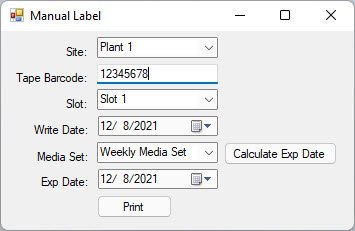
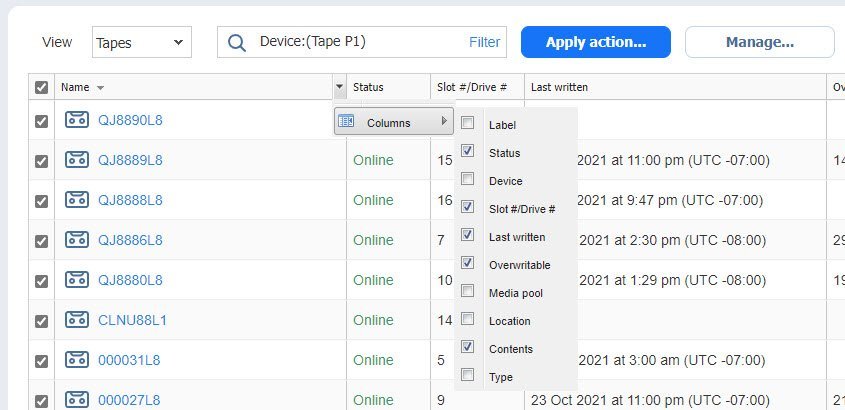
Starting a thread for customer enhancement requests for the Tape function. Thank you Nakivo for making a feature to allow a report to be created on the fly under actions and also to add and remove Columns! See my screen shot. Now, can we get that as a CSV file? I would like to just export what I see on the screen in the Tapes grid to CSV, that way I can choose what columns to show and then export it. THIS HAS TO BE EASY TO DO! I have written my own application for creating Dymo labels for tapes, (I put the label in the clear case, I do not stick it to the tape). I was going to use the Nakivo API to bring data into my app like I can do with Competitor, but I found it to difficult and I didn't want to upgrade my license to get access to the API, so I dropped that from my app. If Nakivo will create a way for the tape information to be exported to CSV, then I will publish a public version of my Dymo label software written in vb.net to github for everyone to use free. It will include a feature that will load the labels to print from the CSV export.

- 1 reply
-
- 1
-

-
Anyone else have problems with Grand-Father-Son (GFS) retention scheme not working as expected? Daily backups work correctly and the retention is correct, but instead of getting weekly and Monthly backups, all my Full backups are set to yearly week after week at both my sites where I have tape libraries. (They expire 11 years from now) I opened a ticket, but they were not able to tell me anything and claimed that everything was working fine. At the time I was not doing daily backups, so I turned that on and they work, but they didn't affect my problem with yearly backups, so for now I'm turning it off to see what happens with just weekly and monthly backups. These are my settings: Retain one recovery point per day for 7 days Retain one recovery point per week for 4 weeks Retain one recovery point per month for 12 months Retain one recovery point per year for 11 years Tape Job Options: Create Full Backup: Every Saturday Tape appending: Start full backup with an empty tape** **I found that now that daily backups are turned on, Nakivo will start writing daily backups to my Full Backup tape before I get a chance to eject it. This is not desirable, but there is no options to segregate GFS tapes. Setting this to "Always start with an empty tape" would burn a tape each day, also not desirable, but I may have no choice. I would like to append all daily backups to the same tape and keep it in the library and only offsite my weekend full backups.
- 1 reply
-
- 2
-
-
The QNAP website seems to imply that they can support running these all at the same time. They say "you can simultaneously run backups, replications and recovery instead of running the jobs separately". So are they incorrect? NAKIVO on NAS | VM backup for VMware vSphere, Microsoft Hyper-V and AWS EC2 | QNAP Here is the Quote on their website: 1.9x Backup Efficiency When deploying NAKIVO on QNAP NAS, you can simultaneously run backups, replications and recovery instead of running the jobs separately. With NAKIVO’s capability to reduce network traffic for up to 50%, LAN-free data transfer, and its incremental backup to only back up changed data, you can greatly benefit from a 1.9x backup speed boost.
-
I noticed that on Windows server, I can only run one job at a time. When I backup to tape or Wasabi, I cannot run my scheduled backups. QNAP says that Nakivo does not have this limitation when running on a Intel or AMD based QNAP NAS. I assume that on QNAP the Backup Copy jobs are running from a snapshot freeing the primary backup to be used at the same time? What other repositories allow replication or backup copy jobs while source backups are running? Synology? FreeNAS? Linux? - Ed Hammond