
User
-
Posts
9 -
Joined
-
Last visited
-
Days Won
4
User's Achievements


-
"bulk delete" for multiple recovery points of a single VM
User replied to User's topic in Backup Repositories
I think you misunderstood my post. I don't want a support case, I described an improvement of the Nakivo application which should be forwarded to the application developers. -
"bulk delete" for multiple recovery points of a single VM
User replied to User's topic in Backup Repositories
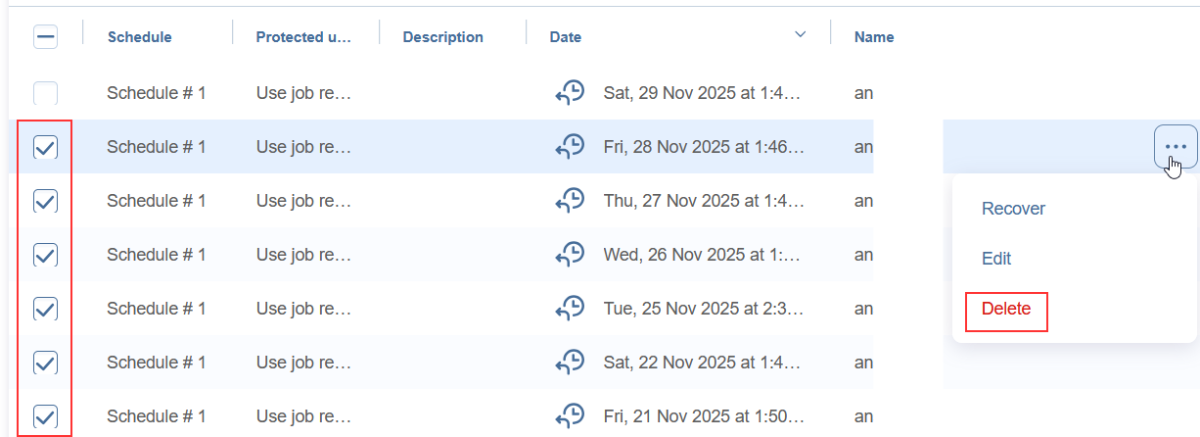
I know this feature, but it's not working for my problem. I don't want to delete "All backups not belonging to any job" but I want to delete "All backups belonging to one VM exept the latest backup". I think this is a missing feature and it's not so difficult to implement it. The feature could be easily enabled either by using the existing checkboxes when deleting individual backups (see screenshot) or by allowing the selection of individual backups for deletion during a bulk delete. I don't understand why the existing checkboxes arn't working for the delete option. It seems to be a bug.
-
Can we allocate more resources for space reclaim to run faster?
User replied to Mark's topic in Backup Repositories
Can you explain how the problem was solved? We have a similar problem, our space reclaim is running for about 60 hours each week, which is a very long time. In my opinion, that is too long. -
"bulk delete" for multiple recovery points of a single VM
User posted a topic in Backup Repositories
Hello, is there a way to delete more then one recovery point of a single VM like in a "bulk mode"? We occasionally have unused VMs that we delete but want to keep their last recovery point. All the other 20 older recovery points are then deleted. Until now we have been deleting each recovery point individually using the delete option of the recovery point. This approach is highly inefficient. Even if you select multiple recovery points, you can only delete one of them using the "delete" option. The existing "Bulk delete" is not applicable in our case because it would also delete recovery points from other VMs. So I'm looking for a delete feature like "bulk delete" which is deleting only recovery points of a single VM. How can we do it? -
Nakivo is installed as appliance without any changes. Only 2 VMs are backuped each night into the onboard repository. These VMs have about 50GB and 80GB disk size, so they are not very large. After a few days I received this warning: The "NAKIVO Backup & Replication" application is about to run out of memory. How can it happen in this small installation using the default configuration? Nakivo VM has 4GB memory and "top" shows about 2GB avail memory. I can't believe that it is a problem of java heap size of director service in this small environment. Please give me an instruction to solve the problem.
- 1 reply
-
- 1
-

-
Yes, of course I mean removing LV, VG and PV. Now I have done all steps to remove the old, unneeded 500GB partition. Until now everything is still working. But you should put this use case into the Nakivo documentation, because using deduplication with a local repository is a common usage of a backup tool. Especially in small installations. And it would be very usefull if deduplication is enabled by default!
- 10 replies
-
- 2
-
-
- vmware cluster
- store backups in seperate files
- (and 7 more)
-
OK, I expected that there would be a simple command to integrate a new repository. It should be included into Nakivo documentation. Fortunately I have good Linux knowledge, so I did it. What do I have to do to remove the old Onboard Repository which is unneeded now? I would remove it from /etc/fstab, remove logical volume, delete partition /dev/sdb and finally remove the 500GB disk from the VM. Is it enough? Or are additional steps needed to remove it properly?
- 10 replies
-
- 1
-
-
- vmware cluster
- store backups in seperate files
- (and 7 more)
-
During creating a new repository I ended with "Cannot create the backup repository. The specified location does not exist." It seems that I missed at least one step. What have I done: - Added a new virtual disk to my Nakivo VM - On the console: "Manage Nakivo services" and press F5 to refresh the list of disks. Now both disks (the default disk and my new disk) are visible. - Connected to Web GUI and "Add Backup Repository" with type "Local Folder", a new Name, Onboard Transporter and a new path to the local folder. - In the options I configured settings for deduplication. It seems that I need to configure where the new disk is mounted in the filesystem (like /etc/fstab) . But how can I do that?
- 10 replies
-
- 1
-
-
- vmware cluster
- store backups in seperate files
- (and 7 more)
-
We installed Nakivo as VM on a VMware cluster and we want to use a backup repository on the local datastore. The default "Data Size Reduction Settings" for the Onboard Repository are "Store backups in seperate files". Unfortunately this setting can't be changed. As far as I know this means, that each VM is stored in separate files without deduplication. The backup size becomes very large. How can I disable "storing in seperate files" and activate deduplication across VMs? In principle the Onboard Repository is what we need, but we need deduplication. My first idea was to delete the onboard repository and to create a new one with proper settings, but that is not possible.
- 10 replies
-
- 1
-
-
- vmware cluster
- store backups in seperate files
- (and 7 more)